Why am I still seeing everyone's events after filtering?
OurCal's calendar shows events based on both calendars and members. If you've selected specific calendars but are still seeing everyone's events, it's likely because all members are still selected too.
By default the filter mode is set to "or", which means it shows events that match either your selected calendars or your selected members. So if all members are ticked, you'll see all their events regardless of which calendars you've picked.
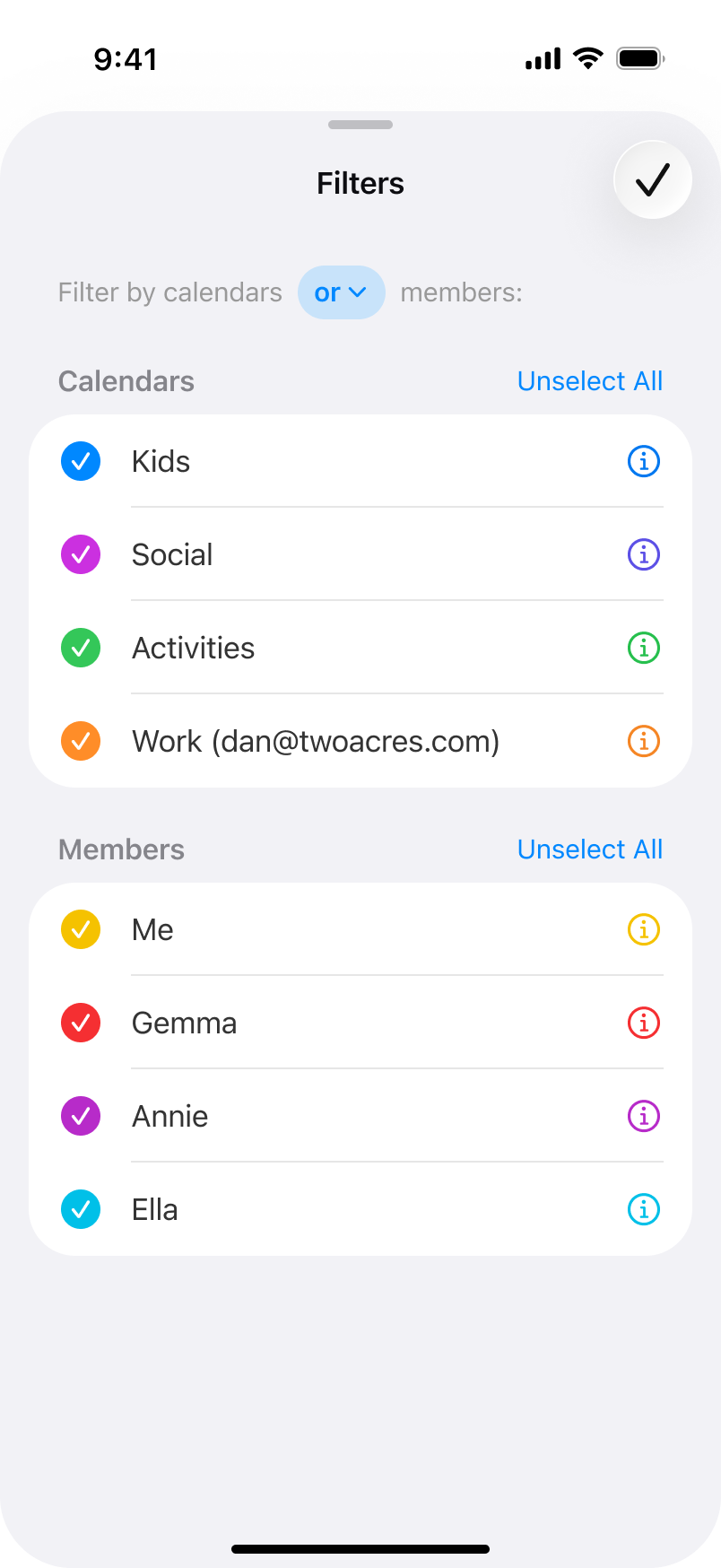
To fix this, you have three options depending on what you're trying to do:
Option 1: Filter by calendars only
Tap "Deselect All" under the Members section so no members are ticked. Only the calendars you've selected will be used to filter events.
Option 2: Filter by members only
Tap "Deselect All" under the Calendars section so no calendars are ticked. Only the members you've selected will be used to filter events.
Option 3: Mix and match with "and" or "or" mode
Select the calendars and members you want, then tap the "or" dropdown to choose your filter mode. "Or" shows events that match either the selected calendars or the selected members. "And" shows only events that match both — e.g. events in the "Kids" calendar that are also assigned to "Annie".
More in Calendars
- Can I share different calendars with different groups?
- Can other group members see all of my events?
- How do I change my default calendar in OurCal?
- How do I configure OurCal widgets on my Home Screen or Lock Screen?
- How do I change times in OurCal to show in 12 hour or 24 hour formats?
- How do I hide the details of events in OurCal?
- How do I add OurCal's calendar widgets to my Home Screen or Lock Screen?
- How do I create a new calendar?